
10-4 by WEX
WEX, Inc.Auto & Vehicles
4.3252.00 Reviews
- Version
- 1.3.5
- Installs
- 100.00K
- Age Rating
- Everyone
Screenshots
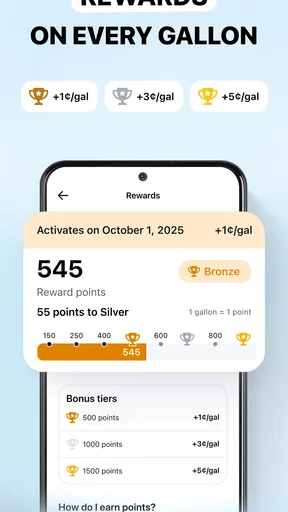
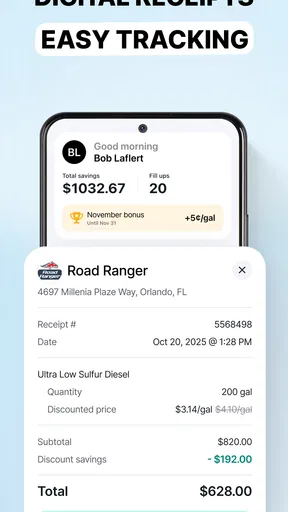
Our Review of 10-4 by WEX
 Analysis by Appyee
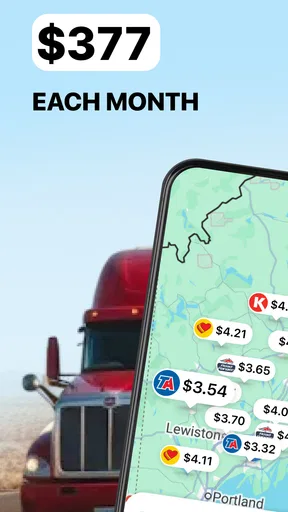
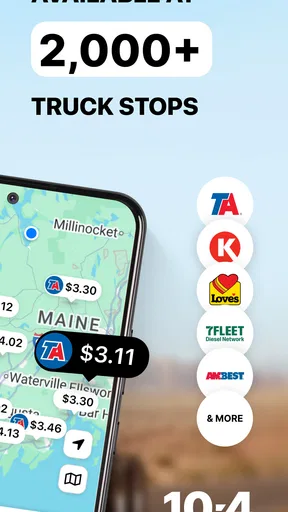
I found 10-4 by WEX most useful when I treated it as a practical fuel-planning tool rather than a general driving companion. It is built for truck drivers who want to look for diesel savings across the country, and that focus makes a real difference. Instead of trying to cover navigation, maintenance, dispatching, or every part of vehicle ownership, it keeps its attention on one costly and recurring task: deciding where to fuel.
That narrow purpose is also what makes the app easier to judge. If you regularly drive a truck and want help comparing fuel opportunities before stopping, it has an obvious role. If you only need occasional directions to a nearby petrol station, a standard maps app may remain the simpler choice. In my experience, the value here depends less on how often you open the app and more on whether fuel decisions are part of your daily route planning.
How it fits into a shared driving routine
A realistic household scenario is not necessarily several people using the app at once. It may be one person who drives professionally while another family member helps with planning from home. A partner might review an upcoming route, discuss where a fuel stop makes sense, or help keep an eye on spending without taking over the driver’s account. That kind of shared planning is where the app can be useful, provided everyone understands that it is a driver-focused tool and not a complete household finance system.
I would use it before leaving, while parked, rather than trying to make fuel decisions while moving. The driver can check the route, consider the available diesel-saving opportunities, and then make a stop plan. A family member could help compare the options verbally or by looking at the same information on the driver’s device, but I would avoid treating one login as a shared household dashboard. The app’s purpose is personal fuel use, so clear boundaries matter.
That distinction is important for couples or relatives who share a tablet or phone. A shared device does not automatically mean shared records, shared preferences, or separate user spaces. I would keep the app associated with the person responsible for the truck and fuel decisions, then use conversation for coordination. This avoids confusion when someone else picks up the device and assumes the displayed information belongs to their own vehicle or route.
The best household workflow is simple: the driver owns the account and the final decision, while another person can help with timing, route discussion, or reminders. I would not use the app as a replacement for receipts, a company fuel procedure, or a proper expense record. Its strength is helping with the choice of where to stop, not organizing every financial detail that follows.
Getting started without mixing responsibilities
The first setup should happen when the driver has time to pay attention. I would install the app on the device normally carried on the road, open it before the first trip, and become familiar with its fuel-search workflow while parked. That initial test is more valuable than waiting until the tank is low and the next stop feels urgent. It also gives the driver a chance to decide whether the information is easy to interpret at a glance.
Because the app comes from WEX, Inc., I would treat it as part of a fuel-focused ecosystem rather than as an independent map replacement. That does not mean it should be forced into every part of a trip. A useful boundary is to let a navigation app handle turn-by-turn directions while using 10-4 by WEX for the fuel-related decision. Switching between tools may feel less elegant than having everything in one place, but it keeps each app doing the job it handles best.
For a shared phone, I would also agree on a basic rule: do not change account details or route assumptions casually. If a spouse, dispatcher, or another driver borrows the device, they should know whether they are simply checking information or changing something that affects future use. Even without inventing special family controls, this ordinary agreement prevents the most common shared-device problem: one person believes the app is configured for their needs while another person has been using it differently.
Age is another part of setup. The app is marked for Everyone, which makes it broadly suitable from an age-rating perspective, but that does not make every use case appropriate for a child. A young person can understand that the app concerns fuel and travel, yet the actual decisions involve a vehicle, money, and road safety. I would let children observe a planning conversation if appropriate, but I would keep account access and final fueling choices with a responsible adult.
The most important setup boundary is separating convenience from authority. Someone may be allowed to look at fuel options without being allowed to make the final call about where a truck stops, how much is purchased, or which account is used. That distinction is especially helpful in households where more than one person shares a device but only one person drives professionally.
Planning fuel stops instead of reacting to the gauge
The obvious use is searching for a better diesel opportunity before stopping. The less obvious benefit is changing the timing of the decision. Rather than waiting until the fuel level creates pressure, I would check the app during a planned break or before starting a long stretch. That gives me room to compare a saving against the practical cost of leaving the route, delaying the stop, or asking the driver to make an unnecessary detour.
A lower price is not automatically the best choice. For a truck driver, the useful question is whether the saving still matters after considering distance, traffic, access, and the amount of fuel needed. I would use the app to identify possibilities, then apply common sense about the vehicle and the route. This is one of the app’s main trade-offs: it can make the fuel search more deliberate, but it cannot make the operational decision for you.
For example, imagine a driver finishing a delivery and preparing for the next leg. A quick check may reveal a diesel-saving option farther along the route. If the truck already needs a break and the stop fits naturally into the journey, the information can be genuinely helpful. If reaching that location requires a detour that costs time or adds unnecessary driving, the apparent saving may not be worth chasing. I would use the app as a comparison point, not as an instruction to pursue the lowest visible figure at any cost.
This is also where coordination with someone at home can help. The driver can explain, “I have two sensible stopping points,” while the other person helps think through timing or the next appointment. That conversation is more useful than handing over control of the account. It keeps the app in its proper role: a shared source of information, with the driver retaining responsibility for the real-world choice.
One practical habit I recommend is checking the app at two different moments: once while planning the route and again when the stop becomes relevant. Fuel conditions and travel circumstances can change, and a plan made too early should not become a rigid promise. I would also keep another way to find a station available, because no single fuel app should be the only tool used when a driver is under time pressure.
What the app does well, and where I felt friction
The strongest part of 10-4 by WEX is its clear identity. It is not trying to be a general-purpose travel app. Its store summary presents it as a way to save on diesel nationwide for truck drivers, and that focus makes the app easier to understand than a broad fuel-and-navigation product filled with unrelated functions. If diesel savings are the reason I am opening an app, I do not have to guess what the central task is.
It is free to install, which lowers the barrier to testing it alongside the tools a driver already uses. The audience is also large enough to suggest that it is not an obscure experiment: the app has passed one hundred thousand installs, carries an average rating of 4.2 from around one and a half thousand ratings, and has more than two hundred written reviews. I read those figures as signs of reasonable interest, not as proof that it will suit every route or every driver.
The main friction comes from the app’s specialization. If I want navigation, trip logging, maintenance reminders, parking information, or a complete record of business expenses, I need other tools or separate habits. That can be a disadvantage for anyone who wants one app to manage the whole working day. A dedicated fuel tool may be more useful than an overloaded all-in-one app for some drivers, but it also means more switching and more responsibility for keeping information organized.
I would also avoid assuming that a displayed saving is the same as a guaranteed final benefit. The practical result depends on the route, the vehicle, the amount purchased, and whether the stop is convenient. That is not a flaw unique to this app; it is simply the reality of fuel planning. Still, it means the app rewards users who compare options thoughtfully rather than those who follow the cheapest-looking choice automatically.
Another limitation is social rather than technical. A household may want a shared history of every fuel decision, but I would not choose this app specifically for that purpose. Its natural use is one driver checking fuel opportunities, not a family maintaining a detailed multi-person budget. If shared accounting is the priority, a dedicated expense tool will be a better companion. If the priority is finding diesel savings before a stop, this app has the more relevant focus.
Account trust and everyday safety
Trust matters because fuel information can influence real spending and travel decisions. I would only share access with someone I trust, and I would explain what they are expected to do before handing over the device. A person helping with planning should know whether they are simply reading options or making changes. Even in a close family, vague access rules can create mistakes that look like app problems but are really coordination problems.
I would keep all searching and discussion parked whenever possible. The app is intended to support drivers, but no fuel saving justifies handling a phone while driving. A passenger can assist with a search, or the driver can wait until a safe stop. This is particularly important in a shared-device household, where someone may assume that a quick check is harmless because the app itself is simple.
The Everyone age rating is reassuring for general accessibility, but I would still explain the context to younger users. They can learn how fuel planning works without being given responsibility for payment decisions or route changes. For teenagers who are beginning to learn about travel costs, the app could support a conversation about comparing convenience with price, but an adult should remain in charge of the account and the vehicle-related decision.
For families with two professional drivers, I would be more careful. A single shared device can be convenient, but it can also blur whose route is being planned. Before using the app, each driver should say which vehicle and trip they are discussing. If the household routinely needs separate records or individualized workflows, separate devices or clearly separated accounts may be less confusing than trying to make one setup serve everyone.
How it compares with ordinary alternatives
Compared with a normal maps app, 10-4 by WEX has a narrower and more useful purpose for a truck driver focused on diesel savings. Maps apps are excellent for directions and broad searches, but they may not present fuel planning with the same emphasis. I would use maps for the route itself and this app for the fuel question, especially when the price difference could affect a long trip.
Compared with a general fuel-price app, the appeal is its connection to the truck-driver use case. A general app may be perfectly adequate for a private car, a short commute, or a driver who only wants the nearest station. I would choose the WEX app when diesel savings are central to the trip and when I am willing to make a separate decision about whether a stop fits the route.
Compared with a company’s internal fuel process, it should be treated as a supporting tool rather than a substitute. A fleet may have its own rules about approved locations, receipts, cards, or reporting. The app can help with the search, but the driver still needs to follow the employer’s procedure. This is a key situation where another option is better: if compliance and expense reporting are the main concern, the company’s established workflow takes priority.
The current version is 1.2.38, and the app requires iOS or Android eleven or later. That makes checking device compatibility part of the practical decision, particularly in a household with an older spare phone. I would not buy or reset a device solely for this app. If the available phone cannot meet the operating-system requirement, a browser-based or built-in alternative may be more sensible for occasional fuel searches.
Who should use it and who should pass
I would recommend it to truck drivers who regularly buy diesel, care about comparing fuel opportunities, and are comfortable using a focused app alongside navigation. It is also a reasonable choice for a household where one person drives and another helps with planning, as long as the account remains clearly owned and managed by the driver. The free price makes experimentation easy, so a driver can see whether the workflow fits real routes without committing to a paid subscription.
I would be less enthusiastic for someone who drives a private car only occasionally. That person may get more value from the map app already on the phone, especially if the main goal is finding the nearest convenient station. I would also suggest skipping it as a primary tool if the user needs detailed mileage records, maintenance tracking, fleet administration, or a shared family budget. Those needs belong to different categories of software.
For a new user, my practical approach would be to test it on a normal trip rather than an unusually complicated journey. Use it before leaving, compare its fuel suggestions with the stops you would ordinarily consider, and notice whether the information helps you make a better decision without adding stress. Then decide whether it deserves a regular place in the driving routine.
My household verdict
After looking at it as both a driver’s tool and a shared-household aid, I see 10-4 by WEX as a focused, sensible option rather than a complete travel solution. Its strongest quality is that it addresses a specific expense with a clear purpose. The free access, Everyone rating, and growing user base make it approachable, while the rating of 4.2 suggests that many users find the idea worthwhile.
My recommendation comes with one condition: use it to inform a fuel decision, not to replace judgment. Check it while parked, compare savings with detours and timing, keep account responsibilities clear, and coordinate with family members without pretending that one shared device is a full multi-user system. Those habits make the app more useful and reduce the confusion that can arise when household convenience crosses into account management.
For a truck driver who wants a dedicated diesel-saving companion, I think it is worth trying. For a family looking for shared finances, a navigation replacement, or complete fleet management, I would choose additional tools instead. In its proper lane, though, the app gives fuel planning a clearer place in the day, and that is enough to make it a worthwhile addition for the right driver.
Privacy and Permissions
See what permissions an app requests and how it handles your data.
- Location
- approximate location (network-based), precise location (GPS and network-based)
- Photos/Media/Files
- read the contents of your USB storage, modify or delete the contents of your USB storage
- Storage
- read the contents of your USB storage, modify or delete the contents of your USB storage
- Camera
- take pictures and videos
- Microphone
- record audio
- Wi-Fi connection information
- view Wi-Fi connections
- Other
- view network connections, change network connectivity, full network access, change your audio settings, run at startup, control vibration, prevent device from sleeping, Google Play license check
Verdict
Strengths of 10-4 by WEX
- Quickly reports emergency incidents with a simple interface.
- Supports location sharing to help responders find you faster.
- Useful for documenting incidents with photos and descriptions.
- Can improve communication during urgent situations.
- Designed to make emergency reporting more accessible.
Limitations of 10-4 by WEX
- Availability and response quality may vary by region.
- Requires a reliable internet connection for key features.
- Location permissions may raise privacy concerns for some users.
- Incorrect reports could create confusion or waste emergency resources.
- Some features may depend on local emergency service integration.
Similar Picks in This Category
View All
Android Auto
Google LLC4.1

maxim — order a taxi & food
PT. SITO4.7

Штрафы ГИБДД: проверка с фото
Pays LLC – Штрафы ГИБДД4.7

Номерограм – проверка авто
Авто Ассист4.8

Дром Авто
Дром4.9

Frequently Asked Questions
What is 10-4 by WEX and what can I use it for?
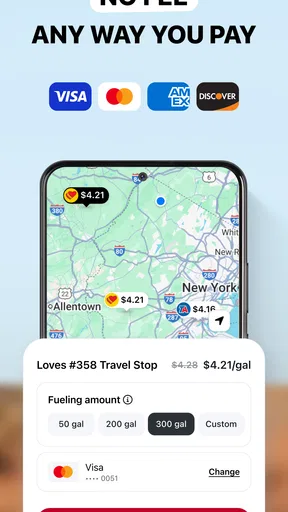
10-4 by WEX is a mobile application designed for drivers and fleet professionals who use WEX fuel cards and related fleet services. After signing in, users can typically access account information, locate participating fuel stations, review fuel-related activity, and manage selected card or fleet tasks from a smartphone. The exact tools available may depend on the WEX program, account type, and permissions assigned by the employer or fleet administrator.
Is 10-4 by WEX free to download and use?
The 10-4 by WEX app is generally available to download without an upfront purchase price, but downloading the app does not automatically provide access to WEX services. You normally need an eligible WEX account, fuel card, or invitation from a participating employer or fleet. Mobile data charges may apply, and any fees connected with fuel cards, transactions, or account services are governed by your WEX agreement rather than the app itself.
Do I need a WEX account or fuel card to use 10-4 by WEX?
Yes, most of the useful features require valid WEX credentials or an eligible company account. The application is intended for authorized drivers, employees, and fleet managers, so access may be restricted according to your organization’s WEX program. If you cannot sign in, your card is not recognized, or certain features are missing, contact your fleet administrator or WEX support instead of creating multiple accounts or entering incorrect information repeatedly.
What permissions and information does the app require?
Depending on the features enabled for your account, 10-4 by WEX may request access to location services, notifications, and internet connectivity. Location access can help with finding nearby fuel stations or presenting location-based services, while notifications may be used for account or transaction updates. Before accepting permissions, review the prompts carefully and check the app’s privacy information. Some functions may be limited if optional permissions are denied.
Is 10-4 by WEX safe and what should I do if it does not work?
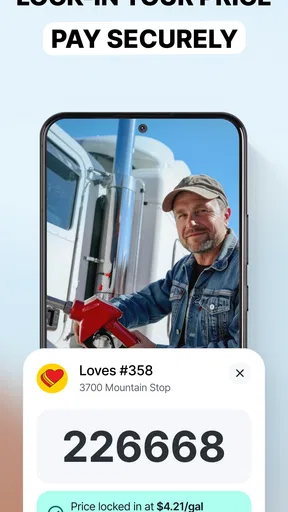
The app is intended to provide secure access to WEX fleet and fuel-account services, but users should still protect their login details, use the official App Store or Google Play listing, and avoid signing in on shared devices. If the app crashes, displays outdated information, or fails to locate stations, update it, check your connection, restart the device, and confirm that location services are enabled. Persistent account or transaction problems should be reported to WEX support.
